Rough Use Case
I need a blogging platform. I picked Astro Paper. I’m using Git as a primitive content management system that’s dev-sque.
Git (High Level)
Git is a file management system that enables scaled async collaboration.
Repo Physical Infrastructure
You have a copy of the code locally. Then, there’s another copy in the cloud or else where remotely on the internet. Origin refers to the copy in the cloud such as at github.com; if you copy from the cloud, you have copied from “origin”. Locally, you can see the “remote” servers that your local git knows about. You are responsible for setting these remotes up.
C:\Users\killm\repo\nonlinearity>git remote
origin
upstream
Repo Logical Infrastructure
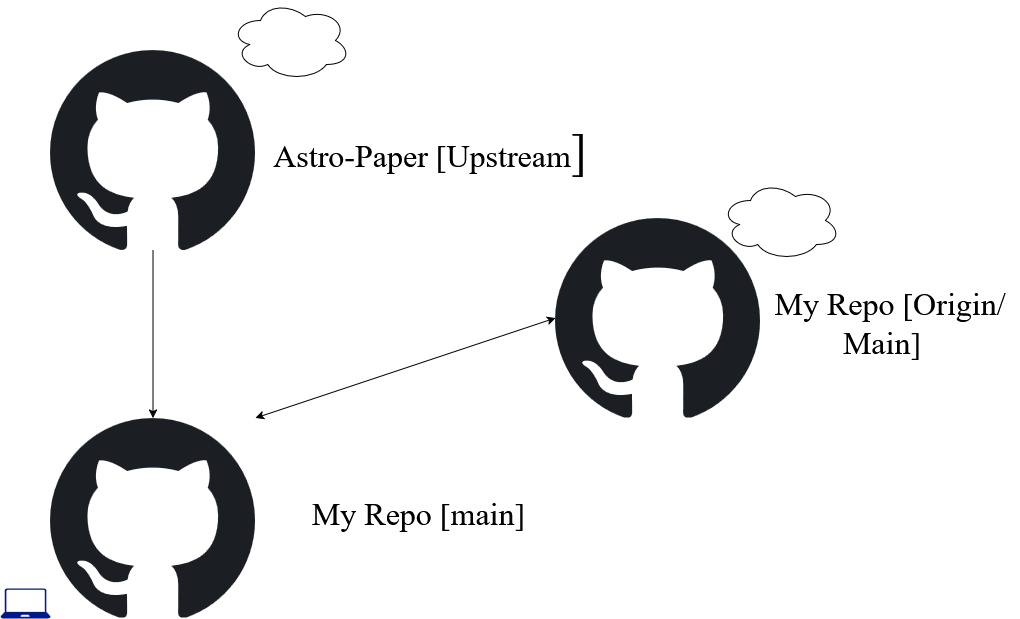
Logically, there is the repo initially that this project, namely the template is pulled from. This is Astro-Paper and we mark this as our Upstream repo, which is located in the cloud. Pulling into My Repo, the local copy is now on my laptop. There is an additional repo in the cloud which is a net new repo and project spawned from the original template. We denote it as Origin/Main despite this is slightly incorrect. It represents the net new cloud repo that maps to this project and the new project spawned from the template.
Git Features
- Distributed: every repo is a full copy (no central server required)
- Content-addressed storage: everything is hashed (integrity by design)
- Snapshots, not diffs: each commit is a full tree snapshot
- Immutable history: commits never change once created
- Fast branching: branches are cheap, movable pointers
- Explicit merging: merge commits record history
- Rebasing: history rewriting for clean linear histories
- Staging area (index): explicit control of what goes into a commit
- Offline-first: all operations work without a network
- Pluggable transport: works over HTTPS, SSH, local files
- Efficient transfer: delta compression + packfiles
- Integrity verification: hashes validated on read/write
- Flexible workflows: centralized, feature-branch, fork-based
- Hooks: local automation on Git events
- Reflog: recover lost commits and movements
- Submodules & worktrees: manage multiple working copies
- Garbage collection: cleans unreachable objects safely
Git Anatomy
Git works off the .git folder. When you open this folder open, you get the following structure.
.git
|___ HEAD                 → points to the current branch (e.g., refs/heads/main)
|___ config               → local repository configuration settings
|___ description          → short description (used by Git web interfaces)
|___ index                → staging area; tracks files ready to be committed
|___ hooks/               → automation scripts triggered by Git events
|    |___ pre-commit.sample
|    |___ pre-push.sample
|    |___ post-merge.sample
|
|___ info/                → auxiliary info for the repo
|    |___ exclude          → local ignore patterns (like .gitignore, but not shared)
|
|___ logs/                → records branch and HEAD changes (used for reflog)
|    |___ HEAD             → history of HEAD movements
|    |___ refs/
|         |___ heads/      → logs for local branch updates
|         |___ remotes/    → logs for remote-tracking branches
|
|___ objects/             → stores all content (commits, trees, blobs)
|    |___ info/            → internal object info
|    |___ pack/            → packed objects (optimized storage)
|
|___ refs/                → references (pointers) to commits
|    |___ heads/           → local branch heads
|    |___ tags/            → tag references
|    |___ remotes/         → remote-tracking branches
|
|___ packed-refs          → optimized list of refs (branches/tags)
|___ FETCH_HEAD           → records the last fetched branch from a remote
|___ ORIG_HEAD            → previous HEAD before operations (merge, rebase, reset)
|___ MERGE_HEAD           → commit being merged (during an active merge)
|___ COMMIT_EDITMSG       → stores the last commit message (temporary)
Common Commands
- fetch
Fetch will only download the remote changes into the local metadata.
- merge
Merge combines two histories.
- pull
pull combines fetching and then merging.
- rebase
Rebase means to take all my commits and replay them on top of the last remote commit.
- log
Prints out the log of the git repo. git log —oneline —graph —all
Clone and Sync Pattern
- Check your remotes.
C:\Users\killm\repo\nonlinearity> git remote -v
origin  https://github.com/dev8lopers/nonlinearity.git (fetch)
origin  https://github.com/dev8lopers/nonlinearity.git (push)
- Add the original repo as the remote (Upstream) because it is.
C:\Users\killm\repo\nonlinearity> git remote add upstream https://github.com/satnaing/astro-paper.git
- Fetch the repo’s latest updates.
C:\Users\killm\repo\nonlinearity> git fetch upstream
- Rebase on a branch, preferably a standalone to taking in the new changes.
git rebase upstream/main
- Push to origin
git push origin main